
Permissions overview
There are six permissions you can toggle when creating a custom Agent Key. Each one unlocks a specific set of capabilities.Permissions are enforced on the server side. Even if an AI agent tries to bypass its restrictions, Shuriken’s server will reject any unauthorized requests. Your funds are protected regardless of what the AI tries to do.
Read Wallets
View your connected wallet addresses and names.Read Balances
View token balances, holdings, and profit/loss data.Read Alpha
Access token mentions from your connected Discord/Telegram groups and trending calls from X (Twitter).Read Tokens
Look up token metadata, market data, and trading statistics.Get Quotes
Create trade plans and get price quotes without actually executing. Useful for research and price checking.The Get Quotes permission gives the agent
plan_trade access. This creates a trade plan with a 5-minute expiry, but the agent cannot execute it without the Execute Trades permission. Think of it like window shopping - you can check the price tag but can’t buy.Execute Trades
Actually move real funds - buy and sell tokens from your wallet.Trading limits
When you enable Execute Trades, you get access to fine-grained controls that cap what your agent can do. These are enforced server-side - the agent cannot override them.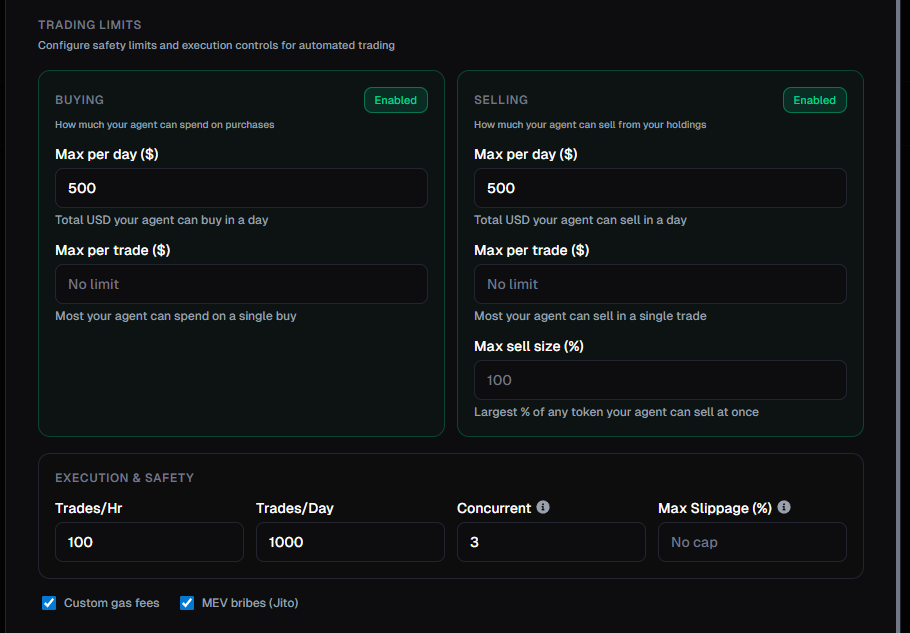
Buying limits
Selling limits
Execution & safety
Additional options
How the two-step trading flow works
Trading always happens in two steps. This is a safety feature - the agent must get a quote before it can execute. Step 1: Plan - The agent callsplan_trade to get a quote. The response includes:
- Exact input and output amounts
- Estimated USD value
- Slippage and price impact
- A plan ID that expires in 5 minutes
- A policy check showing remaining limits (e.g., “500.00 daily buy”)
execute_trade with the plan ID. The server validates the plan hasn’t expired and all limits are still within bounds, then submits the transaction.
If a plan expires (after 5 minutes), the agent must create a new one. This prevents stale quotes from being executed at outdated prices.
Recommended setups
Here are some common configurations depending on what you want your agent to do:Research only (safest)
Research only (safest)
Permissions: Read Alpha, Read TokensUse case: You want the AI to help you research tokens and monitor alpha calls without seeing your wallet or having any trading access.Risk level: None - the agent can’t see or touch your funds.
Portfolio monitoring
Portfolio monitoring
Permissions: Read Wallets, Read Balances, Read Tokens, Get QuotesUse case: You want to ask the AI about your holdings, check PnL, and get trade quotes without giving it the ability to execute.Risk level: None - the agent can see your portfolio but can’t make any changes.
Conservative trading
Conservative trading
Permissions: All six enabledTrading limits:
- Max $10 per trade
- Max $50 per day
- Max sell size: 25%
- Max slippage: 5%
Active trading
Active trading
Permissions: All six enabledTrading limits:
- Max $100 per trade
- Max $500 per day
- Max sell size: 100%
- Trades per hour: 20
Security best practices
- Start read-only. Create a read-only key first to test the connection and get comfortable before enabling trading.
- Use separate keys. Create one key for research and a different key for trading. This way you can revoke trading access without losing your research setup.
- Set conservative limits. Start with low dollar limits and increase them only after you’re confident in your setup.
- Review activity regularly. Check the Agent Keys dashboard to see every action your agent takes in real-time. If anything looks off, pause or revoke the key immediately.
- Revoke unused keys. If you’re not using a key anymore, revoke it. You can always create a new one.
- Never share your key. Your Agent Key is like a password. Don’t post it publicly, commit it to Git, or share it in Discord.