
Create a preset key
Templates are pre-configured keys designed for common use cases. Pick one, give it a name, and you’re done in 30 seconds.1
Open Agent Keys
Click your profile icon in the top-right corner of the terminal, then select Agent Keys.
2
Click + New Agent
This opens the template selection modal.
3
Choose a template
Pick the template that fits your use case (see below for what each one does).
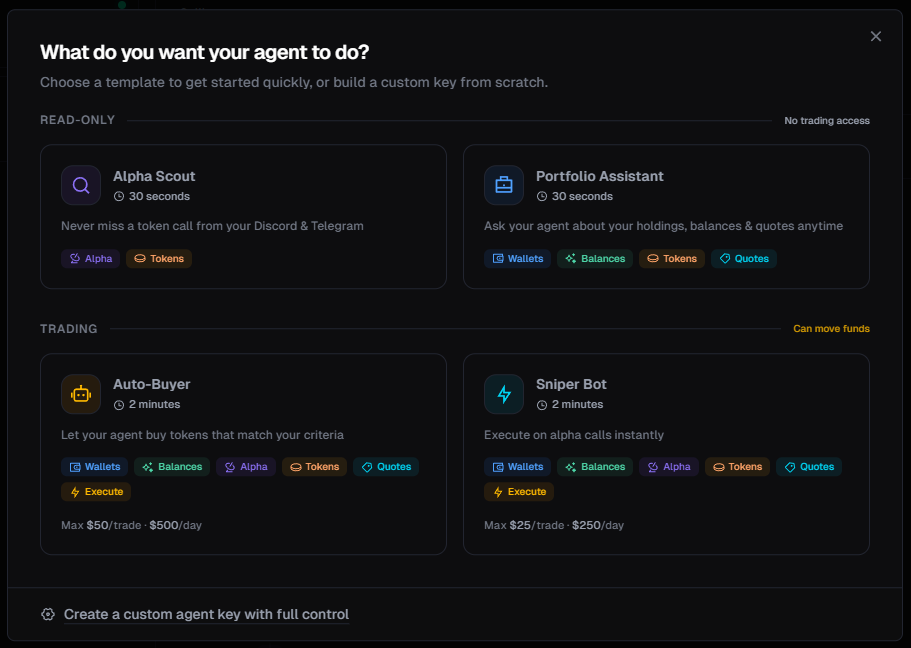
Read-only templates
These keys cannot trade or move funds. They’re safe to experiment with.Alpha Scout
Best for: Monitoring your Discord and Telegram alpha groups through AI.Can do:
- See token mentions from your connected groups
- Look up any token’s price, stats, and market data
- Track which calls are performing best
- See your wallet balances
- Execute any trades
Portfolio Assistant
Best for: Asking your AI about your holdings, balances, and getting trade quotes.Can do:
- View your wallet addresses and balances
- Check token holdings and profit/loss
- Look up token prices and stats
- Get trade quotes (without executing)
- Execute any trades
Trading templates
These keys can move real funds from your wallet. They come with built-in safety limits.Auto-Buyer
Best for: Letting the AI buy tokens that match your criteria automatically.Can do: Everything (wallets, balances, alpha, tokens, quotes, and execution)Default limits:
- Max $50 per trade
- Max $500 per day
Sniper Bot
Best for: Executing on alpha calls instantly as they come in.Can do: Wallets, balances, tokens, quotes, and executionDefault limits:
- Max $25 per trade
- Max $250 per day
Set up your template key
1
Select a template
Click the template card that fits your use case.
2
Name your agent
Give it a descriptive name so you can identify it later (e.g., “My Alpha Scout” or “Cursor Trading Bot”).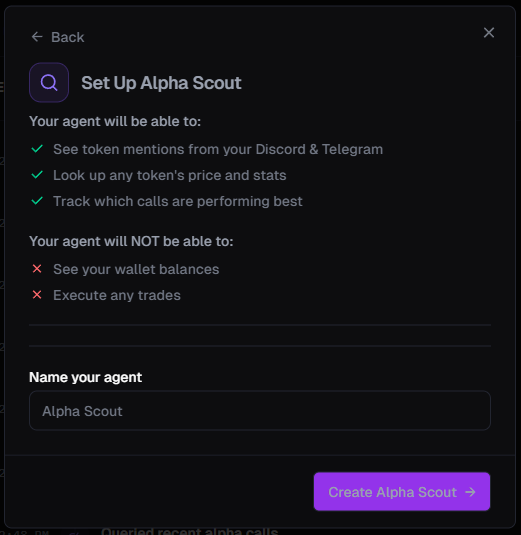
3
Create the key
Click Create and your key will be generated instantly.
Create a custom key
If none of the templates fit, you can build your own key with exactly the permissions you need. Click Create a custom agent key with full control at the bottom of the template modal.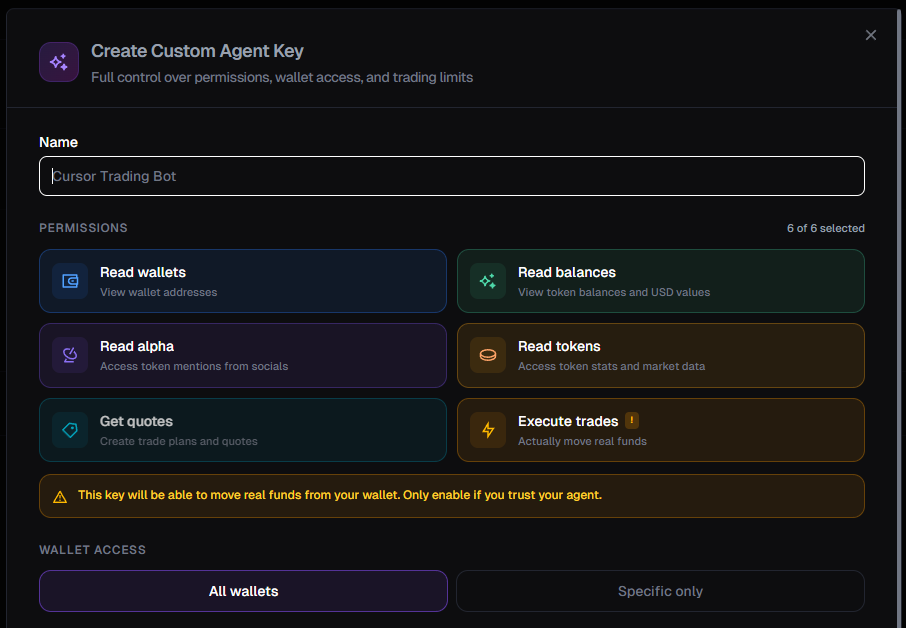
1
Name your key
Enter a name for your agent (e.g., “Research Only” or “Cursor Trading Bot”).
2
Select permissions
Toggle the permissions your agent needs. See the Permissions guide for a detailed explanation of each one.
You can always start with fewer permissions and create a new key later with more access. When in doubt, leave Execute Trades off.
3
Set wallet access
Choose whether the key can access all your wallets or only specific ones.
4
Configure trading limits (if Execute Trades is enabled)
When you turn on Execute Trades, additional safety controls appear. See Permissions & Safety for full details on:
- Buy/sell limits per day and per trade
- Max sell size (percentage of a position)
- Execution rate limits (trades per hour, per day)
- Max concurrent trades
- Slippage cap
- Custom gas fees and MEV protection
5
Enable Telegram (optional)
Scroll down to the Shuriken AI section at the bottom of the modal. Check the Telegram box to allow this key to be used with @shuriken_trade_bot for natural language trading.
Enabling Telegram lets you message the Shuriken bot in plain English - “whats trending”, “buy 0.1 SOL of BONK”, “show my balance” - and it executes within the limits set on this key. See the Natural Language Trading guide for setup details.
6
Create the key
Click Create Key to generate your Agent Key.
Copy your key
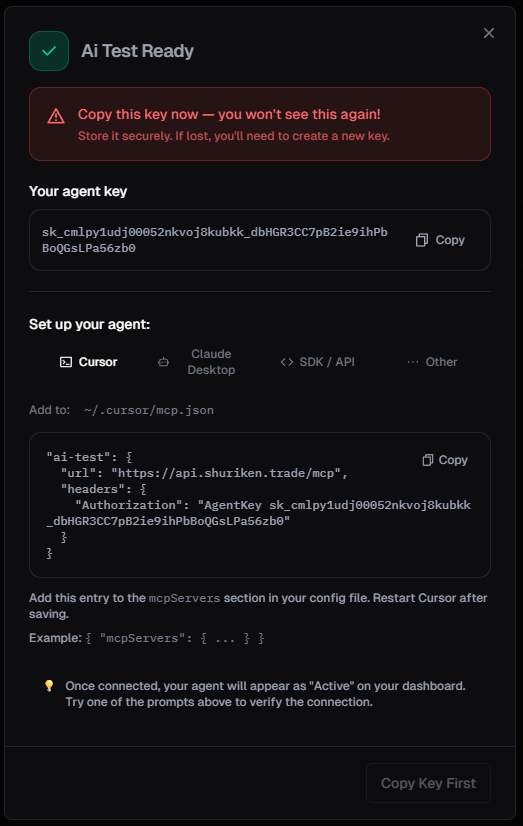
- Your Agent Key - a string starting with
sk_that you’ll paste into your AI tool - Setup instructions - ready-to-copy config snippets for Cursor, Claude Desktop, and other tools
Connect to OpenClaw
Connect to Cursor
Connect to Claude Desktop
Connect to Windsurf
Other MCP clients
Managing your keys
You can view, pause, or revoke your Agent Keys at any time from the Agent Keys dashboard.- Pause - temporarily disable a key without deleting it
- Revoke - permanently delete a key (the AI will immediately lose access)
Monitor your agent’s activity
Every action your agent takes is logged in real-time on the Agent Keys dashboard. Click any key in the sidebar to see its activity feed.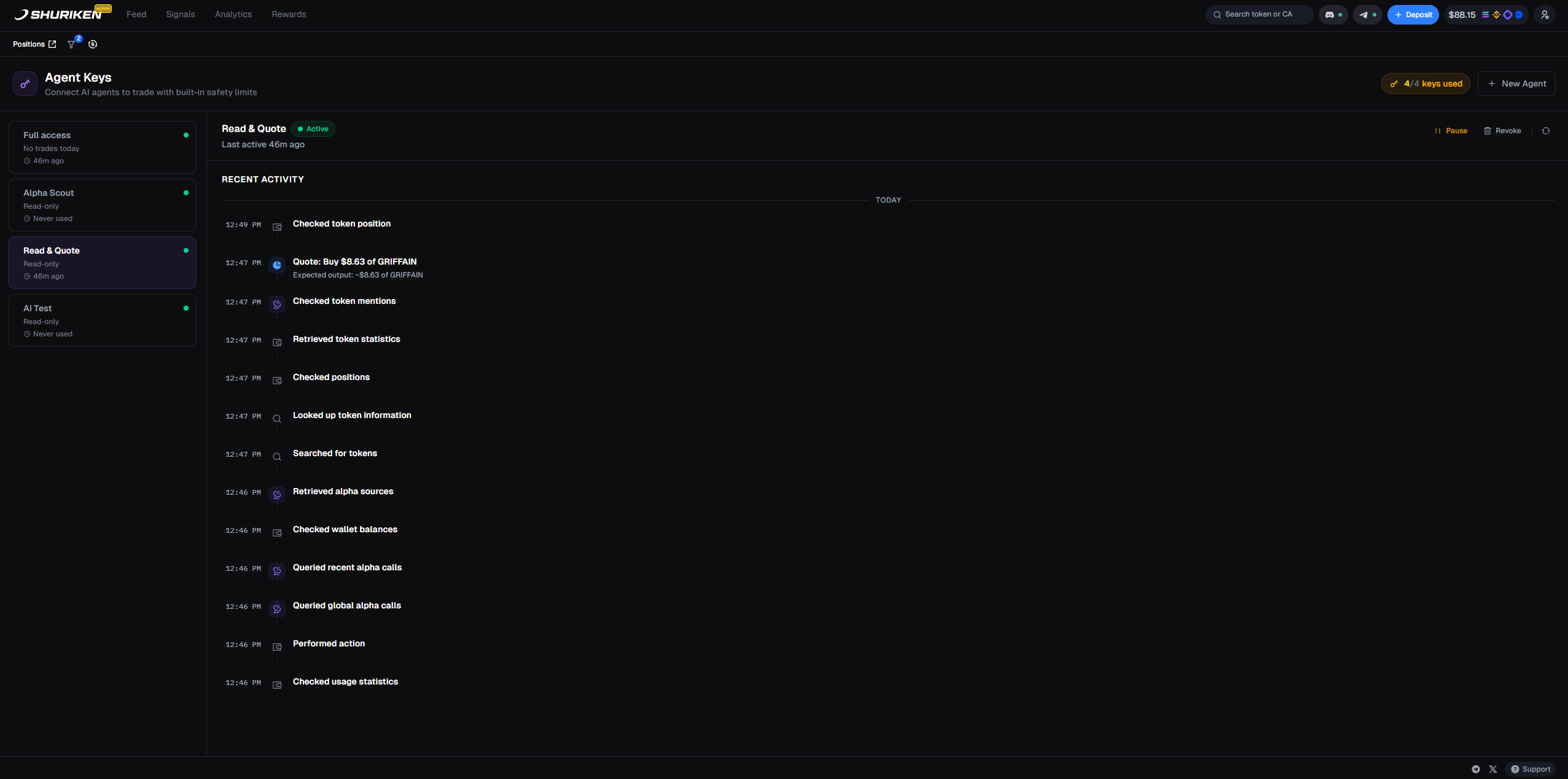
- Every tool call - token lookups, balance checks, alpha queries, and more
- Trade quotes - including the token, amount, and estimated value
- Timestamps - so you can see exactly when each action happened
- Status - whether the key is active, paused, or idle
The activity dashboard is available at app.shuriken.trade/agents. Bookmark it for quick access.