> ## Documentation Index
> Fetch the complete documentation index at: https://docs.shuriken.trade/llms.txt
> Use this file to discover all available pages before exploring further.
# Create a Signal
> A step-by-step tutorial to build a simple signal and start receiving real-time alerts.
Let's build a "Hello, World!" signal. This tutorial will guide you through creating a basic signal that alerts you whenever a specific token is mentioned in a channel you've connected.
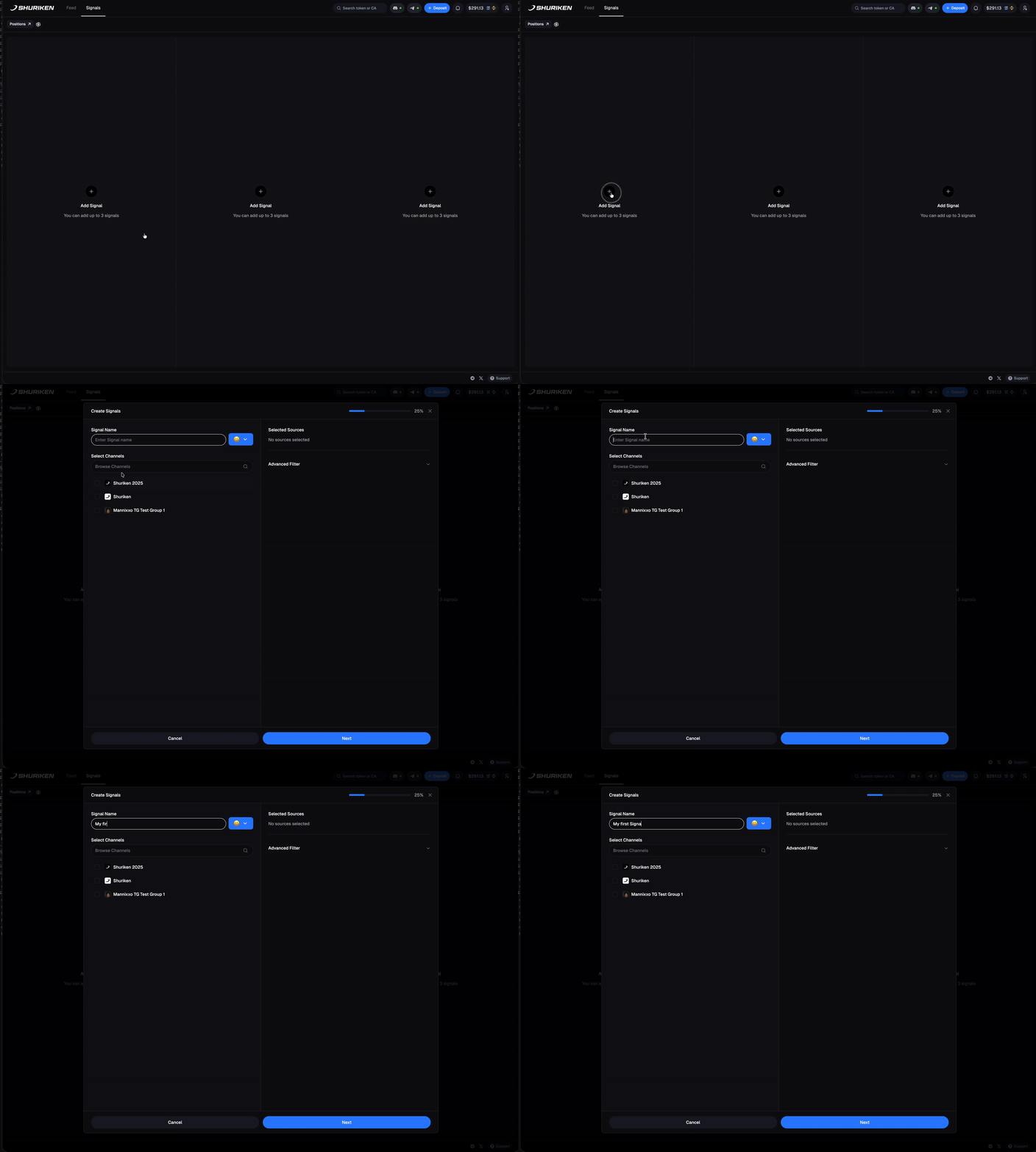 From the Shuriken Terminal, go to the **Alpha Platform > Signals** tab. Click the **"Create New Signal"** button to open the signal editor.
First, tell the signal which chats to monitor.
* Give your signal a name, like "My First Token Alert".
* In the "Sources" section, click **"Add Source"**.
* Select the Discord server and the specific channel(s) you want to watch. You can add multiple sources to a single signal.
For this first signal, we'll keep it simple and not add any advanced conditions. By default, the signal will fire on **any token mention**.
We will explore advanced conditions like market cap and liquidity in the [Signal Conditions](/shuriken-terminal/signal-conditions) guide.
Ensure the **"Enabled"** toggle is on. Click **"Save Signal"**.
That's it! Your signal is now live. The next time a message containing a valid token address — whether on Solana (SVM) or an EVM chain like Base, BSC, or Monad — is sent in your selected channel(s), you will receive a real-time notification in your Terminal.
### What Happens Next?
When your signal fires, you'll see a notification that includes:
* The message content that triggered the signal.
* Enriched metadata about the token (market cap, liquidity, age, etc.).
* A direct link to the message in its original platform.
### Track Interesting Wallets
Discover a wallet making great trades? You can [create a profile](/shuriken-terminal/profiles) for them and track all their future activity directly in your feed.
### Acting on Signals
When you see a signal you want to trade, click the token to open it in the [Trading Terminal](/shuriken-terminal/interface-overview). From there you can:
* [Execute a market order](/shuriken-terminal/market-orders) with preset amounts
* [Set a limit order](/shuriken-terminal/limit-orders) to buy at a specific price
* Review [token analytics](/shuriken-terminal/token-analytics) before deciding
From the Shuriken Terminal, go to the **Alpha Platform > Signals** tab. Click the **"Create New Signal"** button to open the signal editor.
First, tell the signal which chats to monitor.
* Give your signal a name, like "My First Token Alert".
* In the "Sources" section, click **"Add Source"**.
* Select the Discord server and the specific channel(s) you want to watch. You can add multiple sources to a single signal.
For this first signal, we'll keep it simple and not add any advanced conditions. By default, the signal will fire on **any token mention**.
We will explore advanced conditions like market cap and liquidity in the [Signal Conditions](/shuriken-terminal/signal-conditions) guide.
Ensure the **"Enabled"** toggle is on. Click **"Save Signal"**.
That's it! Your signal is now live. The next time a message containing a valid token address — whether on Solana (SVM) or an EVM chain like Base, BSC, or Monad — is sent in your selected channel(s), you will receive a real-time notification in your Terminal.
### What Happens Next?
When your signal fires, you'll see a notification that includes:
* The message content that triggered the signal.
* Enriched metadata about the token (market cap, liquidity, age, etc.).
* A direct link to the message in its original platform.
### Track Interesting Wallets
Discover a wallet making great trades? You can [create a profile](/shuriken-terminal/profiles) for them and track all their future activity directly in your feed.
### Acting on Signals
When you see a signal you want to trade, click the token to open it in the [Trading Terminal](/shuriken-terminal/interface-overview). From there you can:
* [Execute a market order](/shuriken-terminal/market-orders) with preset amounts
* [Set a limit order](/shuriken-terminal/limit-orders) to buy at a specific price
* Review [token analytics](/shuriken-terminal/token-analytics) before deciding