> ## Documentation Index
> Fetch the complete documentation index at: https://docs.shuriken.trade/llms.txt
> Use this file to discover all available pages before exploring further.
# Permissions & Safety
> Understand what each permission unlocks, how trading limits work, and how to keep your funds safe.
The guardrails are set before your agent is even created. You define exactly what it can do, what it can spend, and which wallets it can touch - and Shuriken enforces all of it server-side. The agent can't override any of it, no matter what. This page explains each permission in detail, how trading limits work, and recommended setups for different use cases.
## Permissions overview
There are six permissions you can toggle when creating a custom Agent Key. Each one unlocks a specific set of capabilities.
Permissions are enforced on the server side. Even if an AI agent tries to bypass its restrictions, Shuriken's server will reject any unauthorized requests. Your funds are protected regardless of what the AI tries to do.
### Read Wallets
View your connected wallet addresses and names.
| What the agent can do | Example prompt |
| ------------------------------- | ----------------------------------- |
| List all your wallets | "What wallets do I have connected?" |
| See wallet addresses and chains | "What's my Solana wallet address?" |
### Read Balances
View token balances, holdings, and profit/loss data.
| What the agent can do | Example prompt |
| ------------------------------------------------------- | ----------------------------- |
| Check native balance (SOL, ETH) | "How much SOL do I have?" |
| See all token holdings with USD values | "Show me my portfolio" |
| View PnL per position (cost basis, realized/unrealized) | "What's my PnL on GRIFFAIN?" |
| Check a specific token position | "How much BONK am I holding?" |
### Read Alpha
Access token mentions from your connected Discord/Telegram groups and trending calls from X (Twitter).
| What the agent can do | Example prompt |
| ----------------------------------------- | ---------------------------------------------- |
| See your connected alpha sources | "What Discord servers am I tracking?" |
| View recent token calls from your groups | "What tokens were called today?" |
| See globally trending KOL mentions from X | "What's trending on Crypto Twitter right now?" |
| Get detailed mention history for a token | "Who called ARC and when?" |
### Read Tokens
Look up token metadata, market data, and trading statistics.
| What the agent can do | Example prompt |
| ------------------------------------------------------------ | ------------------------------------ |
| Search tokens by name, symbol, or address | "Find the token called GRIFFAIN" |
| Get price, market cap, and liquidity | "What's the market cap of BONK?" |
| View trading volume and transaction counts (5m, 1h, 6h, 24h) | "Show me 24h volume for SOL" |
| Check number of buyers vs sellers | "Is PEPE seeing more buys or sells?" |
### Get Quotes
Create trade plans and get price quotes without actually executing. Useful for research and price checking.
| What the agent can do | Example prompt |
| --------------------------------- | ------------------------------------------------------- |
| Get a quote for a potential trade | "How much GRIFFAIN would I get for 0.1 SOL?" |
| See the estimated output in USD | "What would it cost to buy \$10 worth of BONK?" |
| View slippage and price impact | "What's the price impact on a 1 SOL buy of this token?" |
| Check remaining daily limits | "How much of my daily budget have I used?" |
The Get Quotes permission gives the agent `plan_trade` access. This creates a trade plan with a 5-minute expiry, but the agent **cannot execute it** without the Execute Trades permission. Think of it like window shopping - you can check the price tag but can't buy.
### Execute Trades
Actually move real funds - buy and sell tokens from your wallet.
| What the agent can do | Example prompt |
| --------------------- | ------------------------------- |
| Buy tokens with SOL | "Buy 0.1 SOL worth of GRIFFAIN" |
| Sell token holdings | "Sell 50% of my BONK position" |
| Check trade status | "Did my last trade go through?" |
This is the only permission that can move money. When enabled, additional safety controls (trading limits) become available. We strongly recommend setting conservative limits, especially when starting out.
## Trading limits
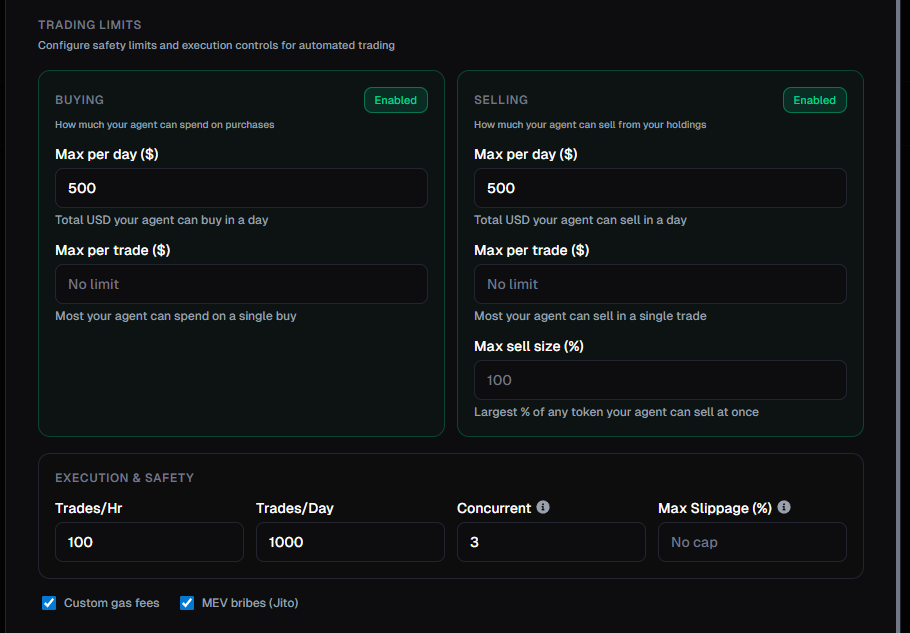
When you enable **Execute Trades**, you get access to fine-grained controls that cap what your agent can do. These are enforced server-side - the agent cannot override them.
 ### Buying limits
| Setting | What it controls |
| ---------------------- | ----------------------------------------------------------- |
| **Max per day (\$)** | Total USD your agent can spend on purchases in a single day |
| **Max per trade (\$)** | Most your agent can spend on a single buy order |
### Selling limits
| Setting | What it controls |
| ---------------------- | --------------------------------------------------------------------------------------------------------------------------------------- |
| **Max per day (\$)** | Total USD your agent can sell in a single day |
| **Max per trade (\$)** | Most your agent can sell in a single trade |
| **Max sell size (%)** | Largest percentage of any token position the agent can sell at once (e.g., 50% means it can never dump an entire position in one trade) |
### Execution & safety
| Setting | What it controls |
| -------------------- | ------------------------------------------------------------------------------------------------------------- |
| **Trades per hour** | Maximum number of trades the agent can execute per hour |
| **Trades per day** | Maximum number of trades per day |
| **Concurrent** | How many trades can be in-flight at the same time |
| **Max slippage (%)** | Highest slippage tolerance the agent can use. Prevents the agent from accepting bad prices on illiquid tokens |
### Additional options
| Setting | What it controls |
| --------------------- | ------------------------------------------------------------------------ |
| **Custom gas fees** | Allow the agent to set priority fees for faster transaction confirmation |
| **MEV bribes (Jito)** | Allow the agent to use Jito tips for MEV protection on Solana |
## How the two-step trading flow works
Trading always happens in two steps. This is a safety feature - the agent must get a quote before it can execute.
**Step 1: Plan** - The agent calls `plan_trade` to get a quote. The response includes:
* Exact input and output amounts
* Estimated USD value
* Slippage and price impact
* A plan ID that expires in 5 minutes
* A policy check showing remaining limits (e.g., "$8.64 / $500.00 daily buy")
**Step 2: Execute** - The agent calls `execute_trade` with the plan ID. The server validates the plan hasn't expired and all limits are still within bounds, then submits the transaction.
If a plan expires (after 5 minutes), the agent must create a new one. This prevents stale quotes from being executed at outdated prices.
## Recommended setups
Here are some common configurations depending on what you want your agent to do:
**Permissions:** Read Alpha, Read Tokens
**Use case:** You want the AI to help you research tokens and monitor alpha calls without seeing your wallet or having any trading access.
**Risk level:** None - the agent can't see or touch your funds.
**Permissions:** Read Wallets, Read Balances, Read Tokens, Get Quotes
**Use case:** You want to ask the AI about your holdings, check PnL, and get trade quotes without giving it the ability to execute.
**Risk level:** None - the agent can see your portfolio but can't make any changes.
**Permissions:** All six enabled
**Trading limits:**
* Max \$10 per trade
* Max \$50 per day
* Max sell size: 25%
* Max slippage: 5%
**Use case:** You want the AI to be able to trade small amounts while you learn how it works.
**Risk level:** Low - even if something goes wrong, exposure is capped at \$50/day.
**Permissions:** All six enabled
**Trading limits:**
* Max \$100 per trade
* Max \$500 per day
* Max sell size: 100%
* Trades per hour: 20
**Use case:** You're comfortable with the agent trading and want it to have enough room to act on opportunities.
**Risk level:** Medium - higher limits mean more exposure if the agent makes a bad call.
## Security best practices
* **Start read-only.** Create a read-only key first to test the connection and get comfortable before enabling trading.
* **Use separate keys.** Create one key for research and a different key for trading. This way you can revoke trading access without losing your research setup.
* **Set conservative limits.** Start with low dollar limits and increase them only after you're confident in your setup.
* **Review activity regularly.** Check the [Agent Keys dashboard](https://app.shuriken.trade/agents) to see every action your agent takes in real-time. If anything looks off, pause or revoke the key immediately.
* **Revoke unused keys.** If you're not using a key anymore, revoke it. You can always create a new one.
* **Never share your key.** Your Agent Key is like a password. Don't post it publicly, commit it to Git, or share it in Discord.
## Next steps
Ready to connect your agent? Pick your AI tool:
### Buying limits
| Setting | What it controls |
| ---------------------- | ----------------------------------------------------------- |
| **Max per day (\$)** | Total USD your agent can spend on purchases in a single day |
| **Max per trade (\$)** | Most your agent can spend on a single buy order |
### Selling limits
| Setting | What it controls |
| ---------------------- | --------------------------------------------------------------------------------------------------------------------------------------- |
| **Max per day (\$)** | Total USD your agent can sell in a single day |
| **Max per trade (\$)** | Most your agent can sell in a single trade |
| **Max sell size (%)** | Largest percentage of any token position the agent can sell at once (e.g., 50% means it can never dump an entire position in one trade) |
### Execution & safety
| Setting | What it controls |
| -------------------- | ------------------------------------------------------------------------------------------------------------- |
| **Trades per hour** | Maximum number of trades the agent can execute per hour |
| **Trades per day** | Maximum number of trades per day |
| **Concurrent** | How many trades can be in-flight at the same time |
| **Max slippage (%)** | Highest slippage tolerance the agent can use. Prevents the agent from accepting bad prices on illiquid tokens |
### Additional options
| Setting | What it controls |
| --------------------- | ------------------------------------------------------------------------ |
| **Custom gas fees** | Allow the agent to set priority fees for faster transaction confirmation |
| **MEV bribes (Jito)** | Allow the agent to use Jito tips for MEV protection on Solana |
## How the two-step trading flow works
Trading always happens in two steps. This is a safety feature - the agent must get a quote before it can execute.
**Step 1: Plan** - The agent calls `plan_trade` to get a quote. The response includes:
* Exact input and output amounts
* Estimated USD value
* Slippage and price impact
* A plan ID that expires in 5 minutes
* A policy check showing remaining limits (e.g., "$8.64 / $500.00 daily buy")
**Step 2: Execute** - The agent calls `execute_trade` with the plan ID. The server validates the plan hasn't expired and all limits are still within bounds, then submits the transaction.
If a plan expires (after 5 minutes), the agent must create a new one. This prevents stale quotes from being executed at outdated prices.
## Recommended setups
Here are some common configurations depending on what you want your agent to do:
**Permissions:** Read Alpha, Read Tokens
**Use case:** You want the AI to help you research tokens and monitor alpha calls without seeing your wallet or having any trading access.
**Risk level:** None - the agent can't see or touch your funds.
**Permissions:** Read Wallets, Read Balances, Read Tokens, Get Quotes
**Use case:** You want to ask the AI about your holdings, check PnL, and get trade quotes without giving it the ability to execute.
**Risk level:** None - the agent can see your portfolio but can't make any changes.
**Permissions:** All six enabled
**Trading limits:**
* Max \$10 per trade
* Max \$50 per day
* Max sell size: 25%
* Max slippage: 5%
**Use case:** You want the AI to be able to trade small amounts while you learn how it works.
**Risk level:** Low - even if something goes wrong, exposure is capped at \$50/day.
**Permissions:** All six enabled
**Trading limits:**
* Max \$100 per trade
* Max \$500 per day
* Max sell size: 100%
* Trades per hour: 20
**Use case:** You're comfortable with the agent trading and want it to have enough room to act on opportunities.
**Risk level:** Medium - higher limits mean more exposure if the agent makes a bad call.
## Security best practices
* **Start read-only.** Create a read-only key first to test the connection and get comfortable before enabling trading.
* **Use separate keys.** Create one key for research and a different key for trading. This way you can revoke trading access without losing your research setup.
* **Set conservative limits.** Start with low dollar limits and increase them only after you're confident in your setup.
* **Review activity regularly.** Check the [Agent Keys dashboard](https://app.shuriken.trade/agents) to see every action your agent takes in real-time. If anything looks off, pause or revoke the key immediately.
* **Revoke unused keys.** If you're not using a key anymore, revoke it. You can always create a new one.
* **Never share your key.** Your Agent Key is like a password. Don't post it publicly, commit it to Git, or share it in Discord.
## Next steps
Ready to connect your agent? Pick your AI tool: