> ## Documentation Index
> Fetch the complete documentation index at: https://docs.shuriken.trade/llms.txt
> Use this file to discover all available pages before exploring further.
# Usage & Billing
> Every NLP request has a small LLM cost. Your daily budget is determined by your trading volume on Shuriken.
Every message you send to the NLP layer - whether from Telegram or any future surface - has a small associated cost from the underlying language model. Shuriken covers this cost up to your daily limit, which scales with how much you trade.
## How your budget works
New users start on **Tier 0** with a one-time \$5 lifetime allowance. That's enough to try the feature and see how it works. To unlock a renewable daily budget, you need to hit \$1,000 in trading volume on Shuriken - which moves you to Tier 1.
From Tier 1 onward, your budget resets every day at midnight UTC.
| Tier | Trading Volume Required | NLP Budget | Reset |
| -------------------- | ----------------------- | ------------ | -------------------------- |
| **Tier 0** (default) | None | \$5 lifetime | Never - one-time allowance |
| **Tier 1** | \$1,000+ | \$1/day | Daily at midnight UTC |
| **Tier 2** | \$10,000+ | \$5/day | Daily at midnight UTC |
| **Tier 3** | \$50,000+ | \$25/day | Daily at midnight UTC |
| **Tier 4** | \$100,000+ | \$50/day | Daily at midnight UTC |
Tier 0 is a lifetime budget - once you've used your \$5, you won't be able to send more NLP messages until you reach \$1,000 in trading volume. Trading volume is cumulative and calculated across all your wallets.
## Viewing your usage
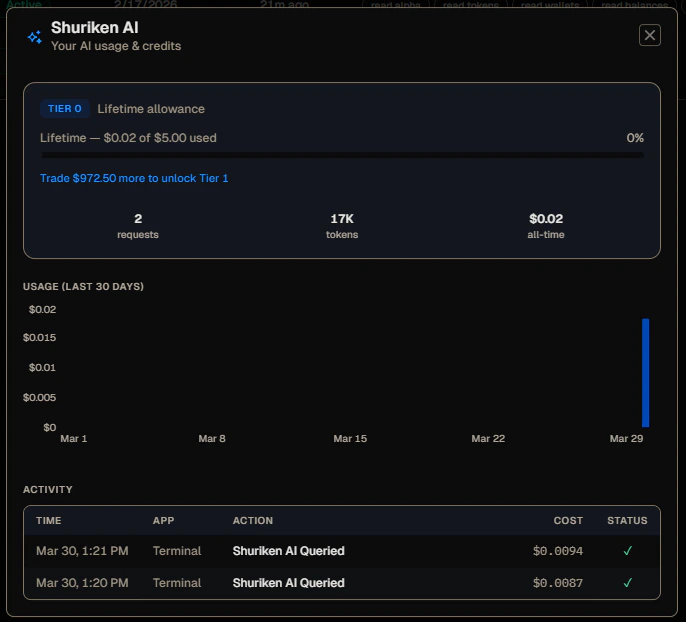
Everything is visible by clicking **AI Usage** in the bottom-right corner of the Agent Keys page.
 ### What you can see
* **Tier and budget** - your current tier, how much of your budget you've used, and how much trading volume you need to reach the next tier
* **All-time stats** - total requests made, total tokens consumed, and total cost
* **30-day usage chart** - a bar chart showing your spend per day over the last month
* **Activity log** - every recent request with the timestamp, which surface it came from (Terminal, Telegram, etc.), the action taken, cost, and status
## Staying within your budget
Each request costs a fraction of a cent in most cases - simple queries like checking a balance or fetching trending tokens are very cheap. More complex multi-step requests (e.g., "research this token and give me a full breakdown") cost more because they involve more tool calls and a longer model response.
If you're approaching your daily limit, stick to simple, direct questions. "What's the price of BONK?" is much cheaper than "Give me a full analysis of BONK with alpha history, on-chain stats, and a trading recommendation."
## Frequently asked questions
The bot will let you know you've hit your daily limit. You won't be charged anything extra - requests simply won't be processed until your budget resets at midnight UTC (or, for Tier 0 users, until you reach \$1,000 in volume).
No. Unused budget does not accumulate. Each day starts fresh at your tier's daily limit.
Volume is calculated from trades executed through Shuriken - including the terminal, Telegram bot, browser extension, and MCP agent. It's cumulative and doesn't reset.
Yes - your current tier, remaining daily budget, and volume progress toward the next tier are all shown on the /agents page in the terminal.
### What you can see
* **Tier and budget** - your current tier, how much of your budget you've used, and how much trading volume you need to reach the next tier
* **All-time stats** - total requests made, total tokens consumed, and total cost
* **30-day usage chart** - a bar chart showing your spend per day over the last month
* **Activity log** - every recent request with the timestamp, which surface it came from (Terminal, Telegram, etc.), the action taken, cost, and status
## Staying within your budget
Each request costs a fraction of a cent in most cases - simple queries like checking a balance or fetching trending tokens are very cheap. More complex multi-step requests (e.g., "research this token and give me a full breakdown") cost more because they involve more tool calls and a longer model response.
If you're approaching your daily limit, stick to simple, direct questions. "What's the price of BONK?" is much cheaper than "Give me a full analysis of BONK with alpha history, on-chain stats, and a trading recommendation."
## Frequently asked questions
The bot will let you know you've hit your daily limit. You won't be charged anything extra - requests simply won't be processed until your budget resets at midnight UTC (or, for Tier 0 users, until you reach \$1,000 in volume).
No. Unused budget does not accumulate. Each day starts fresh at your tier's daily limit.
Volume is calculated from trades executed through Shuriken - including the terminal, Telegram bot, browser extension, and MCP agent. It's cumulative and doesn't reset.
Yes - your current tier, remaining daily budget, and volume progress toward the next tier are all shown on the /agents page in the terminal.